Now available GardenPin 2.0: Live View shows every plant where it grows, even the dormant ones. Free to download; Live View is Premium.
Free on iPhone & iPad · iOS 26

The plant identifier that maps your garden

Identify, pin, label, and care for every plant outside. iPhone and iPad, iOS 26.

Download on the App Store

Free to download.
Premium from $19.99 a year, or $49.99 once. See pricing

  • On-device identification
  • No account
  • Care that cites its source
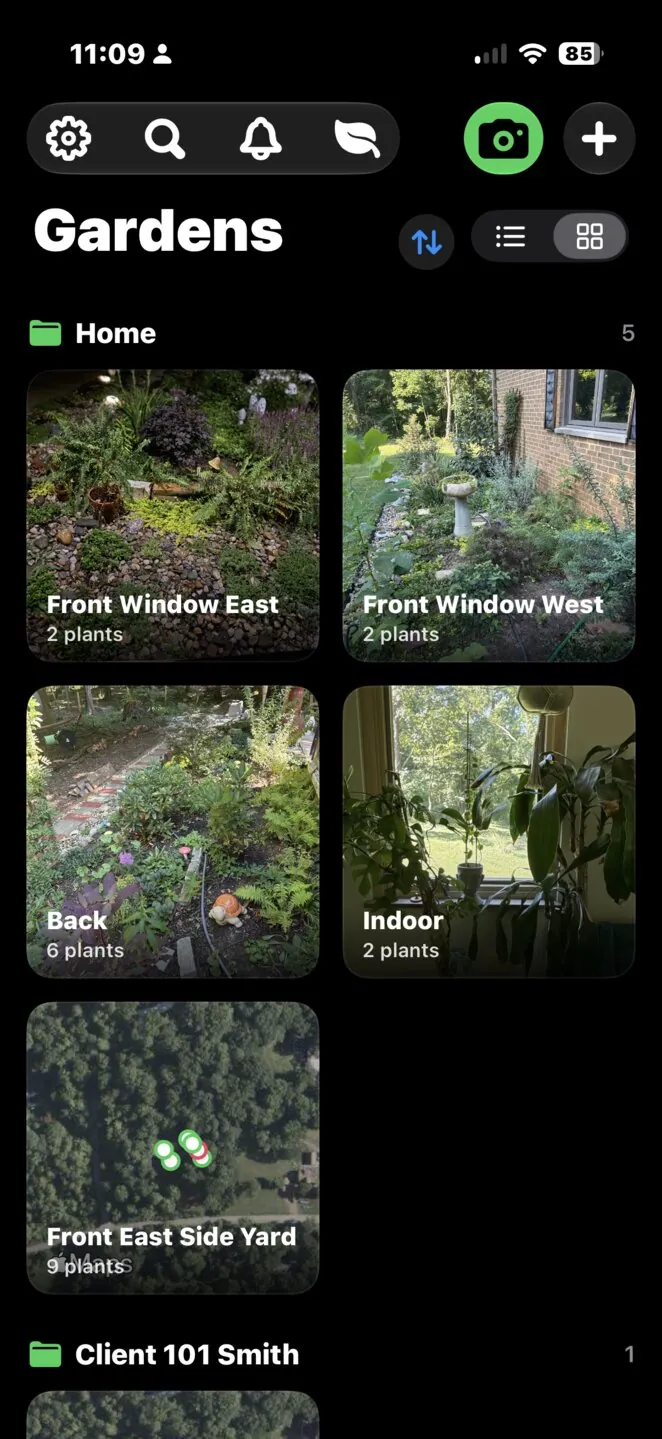
GardenPin's Gardens screen: a grid of photo tiles for each garden, including a map snapshot tile with plant pins
A plant's Care Guide with water, temperature, hardiness zone, soil, and growth rate tiles, captioned with the USDA PLANTS database as its source
New in GardenPin 2.0 · Live View is Premium

Walk your garden. See every plant where it grows.

Hold up your iPhone or iPad and Live View puts a ring on the ground for every plant you have pinned, with its photo and name above it. Tap a label to open the plant's page. Made for the months when nothing shows above ground and you need to know what is sleeping where. Everything runs on your device, and no cloud AI service is involved.

AR garden camera

Live View draws a ring at the base of each pinned plant, with its name and distance. Radar and edge pills point you to plants out of frame.

Garden Markers

Twelve printable designs in four sizes. Fix two per garden, 8 m or more apart, and Live View lines up in seconds each visit.

Place Precisely Premium

GPS pins can sit several feet out. Aim the camera at the base of a plant, tap Place Here, and its spot is exact. Keep more than one layout per garden.

Download on the App Store

Free to download. Live View and Place Precisely need Premium ($19.99 a year, $49.99 once, or $0.99 a week). Requires iOS 26; Live View works best on iPhones and iPads with LiDAR. See pricing

How to use Live View

  1. Print a garden marker. In Settings, open Garden Markers and pick a size: 100 or 150 mm reads from about a metre away, 60 mm hides on a stake or a stone, and 400 mm reads from across the garden. Print at 100% on matte paper.
  2. Fix it where it can stay. Flat on the ground, on a stake, or on a post. Lay two per garden, 8 m (about 26 ft) or more apart: the line between them gives Live View its heading.
  3. Point, then walk. Open Live View and point the camera at a marker from about half a metre (1.6 ft), square on. Your plants snap into place; scan the second marker to tighten the heading. Then walk the beds and the labels follow.

No printer handy? Choose Align to two plants in Live View instead. Read the full Live View guide or how AR garden mapping works.

Real screen recording on iPad.

Watch the walkthrough

  1. Open Live View 0:04
  2. Scan a marker 0:10
  3. Second marker 0:20
  4. Walk your garden 0:33
  5. Align to two plants 0:57
  6. Place precisely 1:17
  7. Close the loop 1:38

Watch on YouTube · The video loads only when you press play.

Identify it. Pin it where it grows. Label it. Care for it.

Plant apps stop at the pot on the windowsill. GardenPin keeps the record of your real garden: what is planted, where, and how it is doing.

Identify any plant

Point the camera at a leaf, flower, or whole plant and get the common name, scientific name, and family. Your phone identifies first and asks PlantNet only when it isn't sure, so many results are instant and need no connection. Every result shows whether the sources agree. Free users get 5 identifications a week.

Map your garden Premium

Drop each plant on a GPS map of your beds, borders, and containers. See what is planted where, and keep several gardens grouped however you like. Tap a pin for that plant's photos, notes, and history, so the map doubles as a garden journal and garden tracker. Browse gardens as a photo grid, a map snapshot, or a plain list. The map view is Premium; lists, grids, and plant pages are free.

Scan the nursery tag, on your phone Premium

Photograph the care card that came with the plant. GardenPin's plant tag scanner reads it entirely on your iPhone and fills in light, water, hardiness, spacing, and mature size, front and back. Nothing leaves the device. Manual entry stays free.

Print QR labels for the whole bed Premium

Batch-print plant labels with a QR code for every plant via AirPrint. Scan a label in the garden to open that plant's page. How QR plant labels work.

Care that cites its source

Every care detail says where it came from: the USDA PLANTS database, Wikidata, PlantSolve, or a quoted sentence from Wikipedia with a link. Care from a scanned tag always comes first. Nothing is generated, and no cloud AI service is involved. Reminders for watering, feeding, and the seasons, with notes and photos per plant.

Share and sync

Share a garden with someone nearby over Wi-Fi or Bluetooth, no account needed. iCloud keeps your gardens on every device. Export to CSV or back up everything as JSON with Premium; restoring from a backup is always free.

Fast ways in

"Identify a plant" from the Action Button, a home-screen widget, Control Center, or Siri.

See it in 90 seconds

Create a garden, identify and pin a plant, scan its nursery tag, and set a care reminder. Real screen recording, no narration needed.

  1. Create a garden 0:04
  2. Pin and identify 0:15
  3. GPS map 0:36
  4. Scan a nursery tag 0:40
  5. Identify anywhere 1:02
  6. Action Button 1:14
  7. Care reminders 1:19

Watch on YouTube · The video loads only when you press play.

Free to start. Pay once if you like.

Everything you need to record a garden is free. Premium unlocks Live View, Place Precisely, the map, the tag scanner, labels, and unlimited identification.

Free

$0
  • Plant identification, 5 per week
  • Unlimited plants, gardens, notes, photos, and reminders
  • Manual care entry
  • Nearby sharing and iCloud sync
  • Restore from backup

Annual Premium

$19.99/ year
  • Everything in Free
  • Live View and Place Precisely
  • Unlimited identifications
  • Nursery-tag scanning
  • Garden map view
  • QR label printing
  • CSV export and JSON backup

Prefer to pay as you go? Premium is also available for $0.99 a week.

What's new

GardenPin 2.0 brings Live View. Before it, the September 2026 update: a grid for your gardens, faster identification on your phone, and care guidance that names its source.

  • Live View (Premium): walk the garden with the camera and see a ring, name, and distance for every pinned plant, including dormant ones.
  • Garden Markers: twelve printable AR targets in four sizes for quick, steady line-up.
  • Place Precisely (Premium): tap the ground through the camera to set each plant's exact position.
  • Multiple layouts per garden, share by link or QR code, and distances in metres or feet.
  • Requires iOS 26; Live View works best with LiDAR.

  • New grid view for Gardens: switch between list and tiles, and give each garden its own tile style — Garden Photo, Map Snapshot, or Text Only. Groups can be sorted by name.
  • Smarter plant identification: your phone identifies the plant first and asks PlantNet only when it isn't sure, so many identifications finish instantly with no network call.
  • Honest confidence: each result now shows whether the sources agree, with a per-source breakdown, instead of one blended percentage.
  • Care guidance that cites its source: watering, soil, growth rate, and cold hardiness from the USDA PLANTS database for over 500 species, hardiness zones from Wikidata, and houseplant care from PlantSolve, all on your device.
  • Care for plants those databases miss: sentences quoted from the plant's Wikipedia article, shown as a quote with a link, never rewritten.
  • Every care detail is captioned with where it came from, and care from a scanned nursery tag always comes first.
  • Care data no longer goes through a cloud AI service, and nothing about your location leaves your phone.
  • Settings → Premium: see your plan, Restore Purchases, and Manage Subscription.
  • Restore Purchases now tells you what happened, and Premium status updates the moment you return to the app.
  • Faster launch, a Terms of Use link in Settings, and fixes.

Questions

Short answers to what people ask before they download.

What is Live View, and is it free?

Live View shows every plant you have pinned through your camera, with a ring at its base, its name, and its distance. It is a Premium feature; the app itself is free to download and Free covers unlimited plants, gardens, notes, and reminders. Live View needs iOS 26 and works best on an iPhone or iPad with LiDAR. Everything runs on your device and no cloud AI service is involved. How AR garden mapping works.

Does GardenPin work offline?

Mostly, yes. Your phone identifies a plant first and only asks PlantNet when it isn't sure, so many identifications finish instantly with no connection. Nursery-tag scanning runs entirely on your iPhone. Your gardens, pins, notes, photos, reminders, and the bundled care data are stored on the device, so you can browse and edit everything without a signal. A connection is needed when the phone hands off to PlantNet and for care sentences quoted from Wikipedia. More on identifying plants offline.

Is my garden data private?

Yes. There is no account. Your data lives on your phone and, if you turn it on, in your own iCloud. Nursery-tag scanning happens on the device and nothing leaves it. Care data does not pass through any cloud AI service, and nothing about your location leaves your phone. A photo is sent to PlantNet only when your phone cannot identify the plant on its own. There are no analytics identifiers. Details are in the Privacy Policy.

Does it cover vegetables and trees, or only houseplants?

GardenPin is built for the garden outside: beds, borders, fruit trees, shrubs, vegetables, and patio containers, as well as houseplants. Watering, soil, growth rate, and cold hardiness come from the USDA PLANTS database for over 500 species, hardiness zones from Wikidata, houseplant care from PlantSolve, and for plants none of those cover, sentences quoted from the plant's Wikipedia article with a link.

Is GardenPin a garden planner?

No. Planners lay out beds you have not planted yet. GardenPin is a garden journal and garden tracker for the garden you already have: each plant pinned on a GPS map of your real beds, with its history, photos, care details, and reminders. It works alongside a planner if you use one.

Can I print labels without Premium?

No. QR label printing is a Premium feature, along with the garden map view, nursery-tag scanning, unlimited identifications, and CSV export and JSON backup. Free includes 5 identifications a week, unlimited plants, gardens, notes, photos, and reminders, manual care entry, nearby sharing, iCloud sync, and restoring from a backup.

How do I restore a purchase?

Open Settings, then Premium, and tap Restore Purchases. The same button is on the paywall. Make sure you are signed in to the Apple Account that made the purchase. GardenPin tells you what happened, and Premium status updates as soon as you return to the app.

From the blog

Guides for gardeners who want to know what is growing where, and honest comparisons of the plant ID apps.